Update (August 19, 2026):
xtop.devnow sits at Cloudflare. I got back in by remembering the answer myself. Support did not resolve it, and none of the documents I submitted mattered. What actually unlocked it — and the three ways the reset form misreports its own state — is at the end of this article.
📖 中文版在下方 — scroll down for the Chinese version.
The incident in one sentence
I could sign in to Dynadot.
I still controlled the account email and phone number.
I could manage xtop.dev through Dynadot and change its DNS through Cloudflare.
I could provide the original payment record, renewal records, my identity document, a company business license, and evidence connecting the domain to hointop.com.
But I could not complete the account unlock or obtain the authorization code needed to transfer the domain.
As far as I could tell, the domain was not expired, unpaid, under a dispute, or subject to a court or registry hold.
The practical blocker was simple:
I no longer knew my four-digit Dynadot Security PIN.
More precisely, I did not remember setting one up at all.
This is not a claim that a PIN should never protect a high-risk account. It is a record of what happened when one account credential became the bottleneck for a domain-recovery process.
How I ended up using Dynadot
I already owned and managed hointop.com.
On April 11, 2025, I registered xtop.dev as a short domain for technical projects and development-related writing. I had looked at several mainland China registration channels but did not find a suitable .dev option, so I chose Dynadot.
The initial process was ordinary:
- create an account;
- register the domain;
- complete payment;
- configure DNS;
- connect Cloudflare;
- renew the domain later.
From registration onward, the domain stayed in my Dynadot account. There had been no account takeover, no loss of email access, and no known third-party claim against the domain.
The problem surfaced more than a year later during an equally ordinary task.
I was only checking domain email
While managing xtop.dev in Cloudflare, I noticed a problem with domain email forwarding. I remembered that Dynadot also offered email-related features, so I signed in to check them.
The system asked for my Security PIN.
I tried a few numbers I might have used. After several failed attempts, further attempts were restricted. Dynadot support reset the failed-attempt count and told me I had three more tries.
I tried once more. It was still wrong.
I stopped guessing. When someone has no reliable memory of a credential, three more guesses are not a recovery method; they are only three more opportunities to lock the account.
A PIN can protect an account without defining domain ownership
Dynadot describes the Security PIN as an additional account-security measure used for actions such as editing account information and unlocking domains. That is a reasonable security goal. A stolen password should not automatically be enough to unlock a valuable domain.
The distinction that matters is this:
| Evidence or credential | What it can show | What it does not prove by itself |
|---|---|---|
| Account login, email, and phone | Current control of account channels | That every requested transfer is authorized |
| Cloudflare DNS access | Operational control over DNS | That the person is the registrar-recorded registrant |
| Original and renewal payments | A purchase and a history of maintenance | The current legal or registration record in every case |
| Identity document and business license | Personal or company identity context | A match with an account record that uses different data |
| Security PIN | Possession of a Dynadot account credential | The complete legal status of the domain holder |
The right question is therefore not “Should Dynadot accept any one of these items?” It is:
When the normal credential is unavailable, does the registrar provide a clear, auditable way to evaluate the complete evidence chain?
For my case, the process felt less like a weighted review of evidence and more like a sequence of gates:
Forgotten PIN
    ↓
Secret question sent by email — one answer, no retry
    ↓
Identity documents requested
    ↓
Organization name does not match (field not identified)
    ↓
No clear next step
That is where an account-protection measure became the practical blocker.
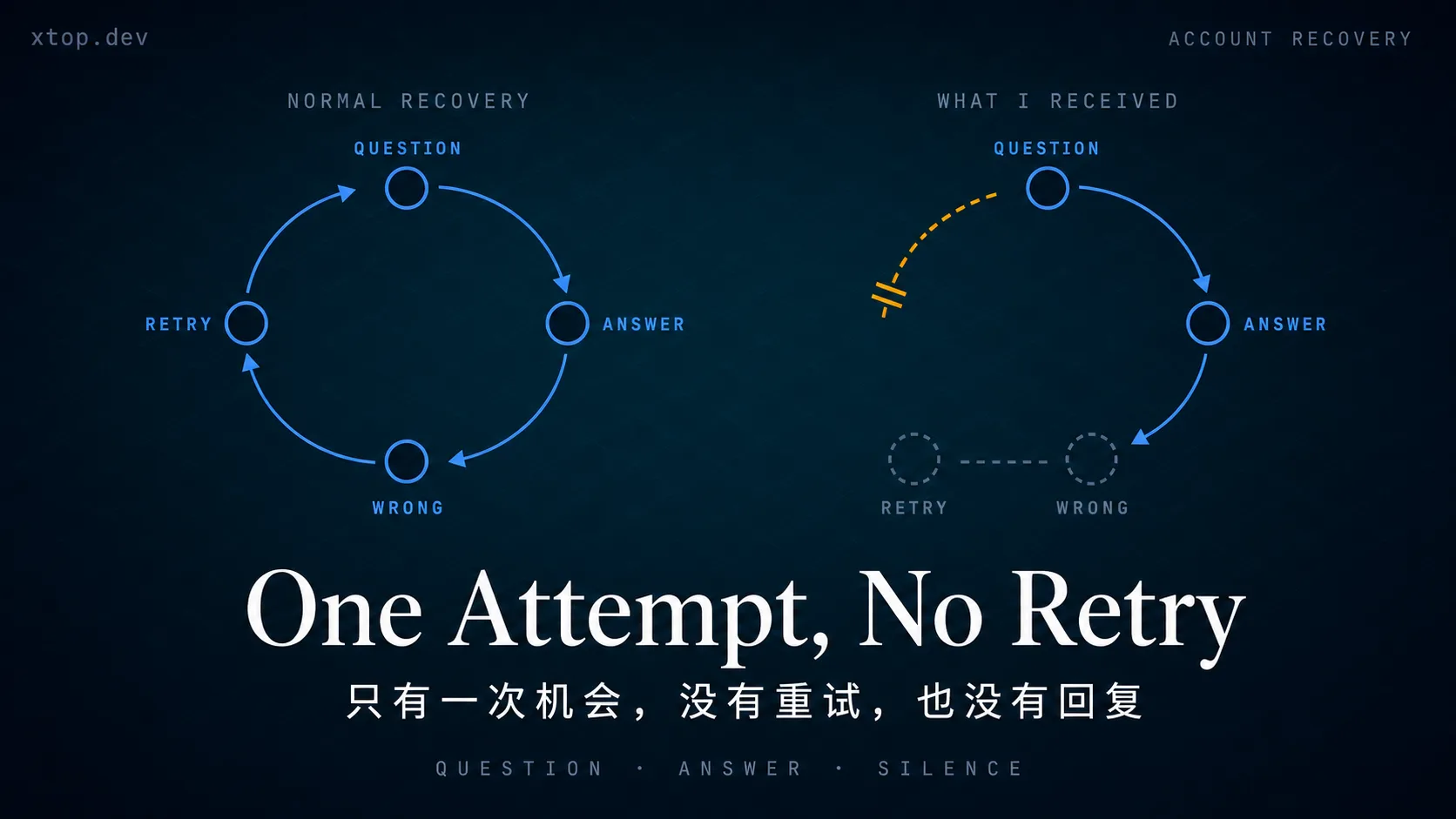
The recovery path had no retry loop
After the PIN attempts failed, I told Dynadot that I could still access the registered email and phone number and could complete email or SMS verification. The response I received said that the recovery process required the secret-question answer and identity information.
What followed did not happen in a self-service form. It happened over email.
Support sent me the secret question:
What was your childhood nickname?
I was asked to reply by email with the answer. I did not have a clear childhood nickname, and I may have entered a placeholder when the account was created. I am not publishing candidate answers in this article; a recovery write-up should not disclose possible answers to an active security question.
I sent one answer, as requested.
Then nothing.
I never received a reply telling me whether the answer was accepted or rejected, whether the ticket was still open, or what the next step would be. My assumption is that the answer was wrong. That is an inference. Nobody told me — and that is the part worth writing down.
The failure is the missing retry loop, not the question
A secret question normally verifies one thing: whether you remember the answer. That design assumes trial and error. The question is shown to you, you try, you are told you were wrong, you try again. The ability to retry is what keeps the mechanism usable for the legitimate owner while still being expensive for an attacker.
In the flow I received, that loop did not exist:
- the question arrived by email, from a person;
- I got one reply to send;
- there was no “incorrect, try again”;
- there was no visible ticket state after the answer was sent.
One attempt, delivered asynchronously, with no confirmation, is not a recovery mechanism. It is a single unannounced pass/fail gate. I have not run into that design at any other registrar or account provider.
The silence compounds it. From the user's side, “wrong answer”, “still under review”, and “ticket dropped” all look identical. There is no state to act on, so there is also no way to know whether waiting, resubmitting, or escalating is the correct next move.
What the documentation describes is not what I received
Dynadot's help documentation describes something different. It says a forgotten-PIN request lets you choose which secret question to answer; that accounts created after March 11, 2025 set up three questions from a list; and that an incorrect answer can be followed by an attempt at another question as a backup. It also says the answer must match exactly, including case, and that identification may be requested. Dynadot's forgotten-PIN instructions and Security PIN documentation
I registered xtop.dev on April 11, 2025 and created the account at that time — after the March 11, 2025 cutoff. The documented flow for an account of that age includes multiple questions and a backup attempt. What I received was a single question over email, one answer, and silence.
I cannot tell from the outside whether my account was classified under the older flow, whether the email thread bypassed the documented self-service request, or whether something else explains the difference. What I can state is the gap: the published recovery design and the recovery process I actually went through were not the same, and nothing in the correspondence explained why.
Security review can be strict and slow. It still needs a visible state:
Security can be slow. It should not be silent.
Identity verification did not make the process clearer
Dynadot also provided an identity-verification link. The page asked me to photograph or record identity documents through a camera-based flow.
In my case, the resulting video was too blurry for me to confirm that the reviewer could reliably read the relevant name, number, portrait, company name, and legal-representative information.
That creates a mismatch between the tool and the standard:
- the process requires exact identity matching;
- the capture result does not make the submitted data easy to inspect;
- the rejection says that the organization name does not match;
- the user is not told which name or field is different.
“The organization name does not match” is a result, not a remediation path. I need to know whether the mismatch is caused by an English company name, a short name, a brand name, a translation, a formatting difference, or an entirely different organization record.
DNS control is operational control, not conclusive ownership proof
The most confusing part is that I can still operate the domain while being unable to move it.
DNS control can affect:
- website routing;
- mail records;
- subdomains;
- SSL validation;
- third-party domain verification.
That is significant operational control, but it is not the same thing as the registrar's registrant record. Someone who controls DNS may have permission from the registrant, access to a hosting account, or control of a separate Cloudflare account. DNS therefore belongs in the evidence chain, not at the end of the ownership argument.
The same distinction applies to payment records. They are useful evidence of purchase and continued maintenance, but the payer, account holder, organization, and registered name holder do not always have to be the same person or entity.
Account lock, domain lock, and Auth-Code are different things
It is easy to treat “cannot unlock the domain” and “cannot obtain the transfer code” as a single operation. They are related, but they are three separate things:
- Account lock: whether I can unlock account-level actions with the Security PIN or recovery process.
- Domain lock: whether the domain is marked as locked for registrar transfer and how that lock can be removed.
- Auth-Code: the authorization code used in an inter-registrar transfer.
Dynadot's domain-unlock instructions say that an account may need to be unlocked with the Security PIN before the domain lock can be removed. Dynadot's domain-unlock instructions
ICANN describes the Auth-Code as a code created by the registrar to help identify the domain name holder and prevent unauthorized transfers. Its registrant FAQ says that a registrar must provide the code within five calendar days when it is requested, unless a valid transfer-denial reason applies. It also says that a registrar must provide a readily accessible and reasonable way to remove a domain lock. ICANN's registrant transfer FAQ
Those rules do not by themselves prove that Dynadot violated its obligations in my case. At the time I wrote this, I had not submitted a formal Auth-Code request through a transfer flow, and I had not recorded the domain's status code or a stated denial reason. So I am not making that claim here.
The narrower claim is the one I can support, and I think it is the more useful one: my account recovery never became clear enough to reach the step where those obligations would even apply. A forgotten PIN does not cancel registrant rights. It just stops you from getting far enough to exercise them.
What Dynadot did reasonably
This experience is not an argument for removing all security checks.
Dynadot did several reasonable things:
- limited repeated incorrect attempts;
- required additional verification before high-risk account or domain actions;
- requested identity information when the normal credential was unavailable;
- did not reset a security credential based only on one ordinary email.
These measures can reduce domain hijacking risk. I was willing to complete a reasonable review. My objection is that the review did not make clear how the existing evidence would be combined into a decision.
Strict security is not the problem. Security that has no visible completion path is the problem.
What the recovery design should improve
The issues I can fairly raise from this case are narrower than “Dynadot does not recognize the owner”:
The fallback path should be explicit
If a user can no longer provide the PIN or secret answer, the registrar should describe the next supported path, the documents required, the expected review time, and the escalation channel.
Evidence should be evaluated in context
Email, phone, account access, payment history, DNS control, identity documents, and the registrar record should not all be treated as interchangeable. They should be assigned clear evidentiary roles.
The capture tool should match the review standard
If exact text matching is required, the user should be able to upload a clear original image or PDF and inspect its quality before submitting sensitive data.
A verification step needs more than one attempt
If a secret answer is wrong, say so and allow another attempt — against the same question or a backup question. A single silent attempt is not verification; it is a coin flip that the account holder is not told the result of.
A rejection should be actionable
“Organization name mismatch” should identify the relevant field or explain what supporting document can resolve the mismatch.
Every ticket should have a state
The user should know whether the request was received, under review, rejected, waiting for more information, or closed.
What this process actually cost
The domain itself was inexpensive. The recovery process was not.
| Cost | What it meant in practice |
|---|---|
| Time | Multiple emails and waiting |
| Privacy | Submitting identity and company documents |
| Effort | Finding original and renewal payment records |
| Risk | Sending sensitive information through a low-clarity capture flow |
| Uncertainty | Not knowing whether the ticket was still active |
| Migration cost | Not being able to complete a transfer smoothly |
When choosing a registrar, people usually compare registration price, renewal price, supported TLDs, DNS features, and email features.
They should also ask:
- What is the recovery path when the PIN is forgotten?
- What happens when the organization name is different from the legal name?
- Can identity documents be uploaded as clear original files?
- How are account lock, domain lock, and Auth-Code requests handled?
- How can a silent or stalled support ticket be escalated?
What I would do differently next time
For every important domain, I would:
- save the Security PIN and recovery answers in a secure password manager;
- record the exact organization name entered in the account, including language and punctuation;
- enable 2FA and store recovery codes separately;
- keep the original registration and renewal records;
- document the registrar's domain-unlock and Auth-Code process before a transfer is urgent;
- save support tickets and screenshots with personal information redacted;
- never publish a real PIN, secret answer, candidate answer, document number, or unredacted ticket identifier.
How it ended
xtop.dev is now at Cloudflare.
It did not end the way the middle of this article implies it might. Nobody weighed my evidence chain. Nobody ever explained which field the organization name failed to match. The resolution came from the one thing the process had already ruled unavailable to me: I remembered the answer.
What actually unlocked it
The forgotten-PIN form does present the three secret questions and let you answer one of them — the flow the documentation describes, though reaching it and getting anything back out of it still ran through support every time. Once I was actually in front of it, the problem stopped being "what was my childhood nickname" and became "which of these three did I set, and in what order did I fill them in." I reconstructed the order I would have used when the account was created, and the answer followed from it.
That distinction matters. I did not recover the credential through a recovery process. I recovered a memory, and the process happened to be standing there when I did.
What did not matter
None of this moved anything:
- the identity document
- the business license
- the original payment record
- the renewal records
- the evidence tying
xtop.devtohointop.com - every email I exchanged with support
Support did not resolve this. It moved forms. The evidence chain this article argues should be weighed in context was never weighed at all — not because it was judged insufficient, but because nothing in the process weighs anything. There is a string comparison, and there is everything else.
The reset form misreports its own state, three times over
This is the part I did not understand while I was inside it.
A silent refresh that means nothing. Submit the reset form choosing a new PIN identical to the existing one, and you get no error and no confirmation. The page simply reloads. Nothing distinguishes that from a rejected answer, a dropped request, or a network failure.
A "success" that is not success. When the form does report success, the request has not gone through. It has been queued for manual review.
Only the email is real. The request is approved or rejected in a back office, and you find out by email. Until that message arrives, the success notice on screen is a guess.
There still is no retry loop
Nothing here walks back what the article says above. The form exists, but it does not close the loop on its own. A submission is not adjudicated on screen — it is queued for a person, and getting another attempt means going back to support and pushing that thread forward again. Every single attempt costs a round of correspondence with a human who may or may not answer.
So "no retry loop" was not a description of one unlucky email thread. It is the shape of the entire process. The form is a submission box, not a verification step.
Layer the misreported state on top of that and it gets worse. At nearly every point the interface's feedback does not correspond to what happened: silence can mean a duplicate PIN, success can mean pending, and the only authoritative signal arrives out-of-band in your inbox. You cannot build a correct model of where you stand, and you cannot try again without another round-trip through support. That combination is why weeks of this feels like shouting into a void even when the mechanism is, technically, working.
This is a personal account of one recovery process, not a claim about every Dynadot account or every support case.
I started by trying to inspect domain email. I ended up learning that the most dangerous single point of failure may not be DNS, a server, or SSL. It may be a registrar credential that the account holder no longer remembers creating.
The PIN should protect the account. It should not be the only intelligible path back to the person who can explain the account's history.
If you are designing or reviewing a similar account-recovery flow, contact me.
我能登录 Dynadot,却被一个忘记的四位 PIN 卡住了域名转移
更新(2026 年 8 月 19 日):
xtop.dev已经转到 Cloudflare。最后是我自己想起了答案。 客服没有起到作用,我提交的所有资料也没有起到作用。真正解开它的是什么,以及 重置表单在哪三个地方误报自己的状态,写在本文末尾。
📖 English version above — scroll up for the English version.
一句话说清楚这件事
我可以登录 Dynadot。
我仍然可以使用账户绑定的邮箱和手机号码。
我可以在 Dynadot 里管理 xtop.dev,也可以通过 Cloudflare 修改它的 DNS。
我可以提供域名最初的付款记录、后续续费记录、个人身份证、公司营业执照,以及能够说明 xtop.dev 与 hointop.com 关联关系的资料。
但我无法完成账户解锁,也无法取得转移域名所需要的授权码。
据我当时掌握的情况,域名没有过期、欠费、仲裁、投诉或司法/注册局锁定问题。
真正卡住流程的是一件很简单的事:
我不再知道自己的四位 Dynadot Security PIN。
更准确地说,我完全不记得自己设置过这个 PIN。
这不是说高风险账户不应该有 PIN,而是记录一个具体问题:当正常凭证无法使用时,一个账户凭证如何成为域名恢复流程的实际瓶颈。
我为什么会使用 Dynadot
我原本就持有并管理 hointop.com。
2025 年 4 月 11 日,我注册了 xtop.dev,打算把它用于技术项目和开发相关内容。当时我看过几个中国大陆的注册渠道,但没有找到合适的 .dev 注册入口,所以选择了 Dynadot。
一开始的过程很普通:
- 创建账户;
- 注册域名;
- 完成付款;
- 设置 DNS;
- 接入 Cloudflare;
- 后续正常续费。
注册以后,域名一直在我的 Dynadot 账户中。期间没有账户被盗、邮箱失效,也没有已知的第三方对域名提出权利争议。
问题是在一年多以后,一个同样普通的操作中出现的。
我只是想检查一下域名邮箱
我在 Cloudflare 管理 xtop.dev 时,发现域名邮件转发有问题。我记得 Dynadot 也提供邮件相关功能,于是登录后台准备检查。
系统要求我输入 Security PIN。
我尝试了几个可能的数字。几次失败以后,系统限制了继续尝试的机会。Dynadot 客服帮我重置了失败次数,并告诉我还有三次机会。
我又试了一次,仍然不对。
之后我没有继续猜。一个人完全不记得某个凭证时,再给三次机会不是恢复方案,只是多三次锁定账户的机会。
PIN 可以保护账户,但不能单独定义域名权利
Dynadot 将 Security PIN 说明为账户安全措施,用于修改账户资料、解锁域名等操作。这个安全目标本身是合理的:登录密码被盗,不应该自动意味着别人可以解锁一个有价值的域名。
真正需要区分的是下面几类证据:
| 证据或凭证 | 能说明什么 | 单独不能说明什么 |
|---|---|---|
| 账户登录、邮箱和手机 | 当前能够控制账户渠道 | 不能单独证明每个转移请求都获得授权 |
| Cloudflare DNS 权限 | 对域名 DNS 的实际控制 | 不能单独证明是注册商记录中的注册人 |
| 首次付款和续费记录 | 购买和持续维护的历史 | 不一定等同于当前法律或注册记录 |
| 身份证和营业执照 | 个人或公司身份背景 | 不一定与账户中的组织字段完全一致 |
| Security PIN | 持有 Dynadot 账户凭证 | 不能单独定义域名持有人的完整身份 |
所以问题不是“Dynadot 是否应该接受其中任意一项”,而是:
当正常凭证失效时,注册商是否提供了一条清晰、可追踪、能够综合评估证据链的恢复路径?
在我的经历里,流程更像是一连串关卡:
忘记 PIN
    ↓
客服邮件发来秘密问题 —— 只回一次,没有重试
    ↓
提交身份证明
    ↓
组织名称不匹配(不说是哪个字段)
    ↓
不知道下一步是什么
问题就在这里:账户保护措施变成了实际阻塞点。
恢复流程没有重试环节
PIN 尝试失败后,我告诉 Dynadot:注册邮箱和手机仍然可以正常使用,也可以配合邮箱或短信验证。对方回复说,恢复流程需要秘密问题答案和身份资料。
接下来的过程不是在一个自助表单里完成的,而是通过邮件。
客服把秘密问题发给了我:
What was your childhood nickname?
对方要求我用邮件回复答案。我没有一个明确的“童年昵称”,创建账户时可能填的是占位内容。本文不公开任何可能的答案——公开活动账户的秘密答案候选值,会增加社工和账户恢复风险。
我按要求回了一个答案。
然后就没有了。
我始终没有收到回复告诉我:答案是对是错、工单是否还开着、下一步该做什么。我猜是答错了。但这只是猜测,没有任何人告诉过我——而这才是真正值得记录下来的地方。
问题不是那道题,是没有试错的机会
秘密问题这个机制,本来只验证一件事:你还记不记得答案。它的前提就是允许试错——系统把问题显示给你,你答,答错了告诉你错了,你再答。可以重试这个设计,才让它对真正的账户持有人可用,同时对攻击者仍然昂贵。
而我遇到的流程里,这个循环根本不存在:
- 问题是人工通过邮件发过来的;
- 我只有一次回复的机会;
- 没有“答错了,请重试”;
- 答案发出去之后,工单没有任何可见状态。
异步送达、只能答一次、答完没有任何确认——这不是恢复机制,而是一道不宣布结果的一次性通过/失败关卡。这种设计我在其他任何注册商或账户服务里都没有见过。
沉默让问题被放大了一层。站在用户这边看,“答错了”“还在审核”“工单没人接”三种状态长得一模一样。既然没有状态可依据,也就无从判断该继续等、该重新提交,还是该升级投诉。
文档写的流程,和我实际走的流程不是同一套
Dynadot 的帮助文档描述的是另一回事:忘记 PIN 的申请可以由你选择回答哪一道秘密问题;2025 年 3 月 11 日以后创建的账户要从列表里设置三道问题;答错之后可以换另一道问题作为备用再试一次。文档同时说明答案必须完全一致(含大小写),并且可能要求提交身份证明。Dynadot 忘记 PIN 说明 和 Security PIN 说明
我是 2025 年 4 月 11 日注册 xtop.dev 并同时创建账户的——在 2025 年 3 月 11 日这个分界之后。按文档,这个年龄的账户应该有多道问题和一次备用重试。我实际拿到的是:邮件里的一道问题、一次作答、然后沉默。
我无法从外部判断,究竟是我的账户被归入了旧流程、是这条邮件线绕开了文档里的自助申请入口,还是有别的原因。我能确定的只是这个落差本身:公开文档描述的恢复设计,和我实际经历的恢复过程不是同一套,而往来邮件里没有任何一句解释为什么。
安全审核可以严格,也可以需要时间,但必须让用户知道当前状态:
安全流程可以慢,但不能没有状态。
身份验证没有让流程更清楚
Dynadot 还提供了一个身份验证链接,需要通过摄像头拍摄或录制证件。
在我的这次经历中,最终生成的视频比较模糊,我无法确认审核人员能否清楚读取姓名、证件号码、人像、营业执照公司名称和法定代表人信息。
这造成了验证工具和审核标准之间的不匹配:
- 审核要求资料精确匹配;
- 采集结果却不容易让用户确认清晰度;
- 最终反馈是组织名称不匹配;
- 但没有说明到底是哪一个名称或字段不同。
“组织名称不匹配”是一个结果,不是可执行的解决路径。我需要知道,差异究竟来自英文公司名、简称、品牌名、翻译、格式,还是账户中登记了完全不同的组织。
DNS 控制是运行控制,不是完整的注册人证明
最让人困惑的状态是:我仍然可以让域名继续运行,却不能把它转移出去。
DNS 控制可以影响:
- 网站指向;
- 邮件记录;
- 子域名;
- SSL 验证;
- 第三方域名验证。
这确实是很重要的运行权限,但它不等于注册商记录中的注册人身份。控制 DNS 的人可能是注册人、被授权的管理者、主机账户使用者,或者只是另一个 Cloudflare 账户的控制者。因此,DNS 应该是证据链的一部分,而不是所有权结论的终点。
付款记录也是一样。它能说明购买和持续维护历史,但付款人、账户持有人、公司主体和注册人并不一定始终是同一个人或实体。
Account Lock、Domain Lock 和 Auth-Code 不是一回事
“无法解锁域名”和“无法取得转移码”很容易被当成同一个动作。它们有关联,但其实是三件事:
- Account Lock:能否通过 PIN 或恢复流程解锁账户级操作。
- Domain Lock:域名是否处于禁止注册商转移的锁定状态,以及如何解除。
- Auth-Code:注册商之间转移域名时使用的授权码。
Dynadot 的域名解锁说明表示,如果账户处于锁定状态,需要先用 Security PIN 解锁账户,之后才能继续解除域名锁。Dynadot 域名解锁说明
ICANN 将 Auth-Code 定义为由注册商生成、用于帮助识别域名持有人并防止未经授权转移的代码。ICANN 的注册人 FAQ 还说明,正式请求后,注册商通常必须在五个日历日内提供 Auth-Code,除非存在有效的拒绝转移理由;对于域名锁,也必须提供方便且合理的解除方式。ICANN 注册人转移 FAQ
这些规则本身并不能证明 Dynadot 在我的个案中违反了义务。写下这段时,我还没有通过正式转移流程提交过 Auth-Code 请求,也没有记录域名的状态码或任何明确的拒绝理由。所以本文不作这个主张。
我能支撑的是一个更窄、但我认为更有用的结论:我的账户恢复流程从头到尾都没有清晰到能走到「这些义务开始适用」的那一步。忘记 PIN 并不会取消注册人的权利,它只是让你走不到能行使这些权利的地方。
Dynadot 哪些地方是合理的
这件事不是要求取消所有安全检查。
Dynadot 做的几件事是合理的:
- 限制连续输入错误的次数;
- 对高风险账户或域名操作增加验证;
- 在正常凭证失效时要求提交身份资料;
- 不因为一封普通邮件就直接重置安全凭证。
这些措施可以降低域名被盗风险。我也愿意配合合理审核。我的问题在于,现有证据应该如何被组合、最终如何得出结论,整个过程没有被清楚说明。
严格安全不是问题。没有可完成路径的严格安全,才是问题。
这套恢复设计应该改进什么
基于这次经历,我能提出的批评应该比“Dynadot 不承认注册人”更具体:
兜底路径应该写清楚
如果用户无法提供 PIN 或秘密答案,注册商应该明确说明下一条可用路径、所需材料、预计审核时间和升级渠道。
证据应该放在上下文里判断
邮箱、手机、账户登录、付款记录、DNS、身份证明和注册商记录并不是同一种证据。系统应该说明它们各自验证什么,而不是让一个字段直接否定全部材料。
采集工具应该匹配审核标准
如果要求精确读取文字,就应该允许上传清晰的原始图片或 PDF,并在提交前让用户确认文件质量。
验证环节不能只给一次机会
答案错了就应该明确告知,并允许再试一次——同一道题也好,换一道备用题也好。只有一次、还不告诉你结果的作答,不叫验证,那是一次账户持有人自己都不知道结果的抛硬币。
拒绝结果应该可以执行
“组织名称不匹配”应该指出相关字段,或者明确说明什么补充材料能够解决差异。
每个工单都应该有状态
用户至少应该知道:请求已收到、审核中、被拒绝、等待补充资料,还是已经关闭。
这件事真正花掉了什么
域名本身并不贵,恢复过程才贵。
| 成本 | 实际内容 |
|---|---|
| 时间 | 多轮邮件和等待 |
| 隐私 | 提交身份证和公司资料 |
| 精力 | 查找首次付款和续费记录 |
| 风险 | 通过低清晰度工具提交敏感信息 |
| 不确定性 | 不知道工单是否仍然有效 |
| 迁移成本 | 无法顺利完成转移 |
选择注册商时,大多数人会比较注册价格、续费价格、支持的后缀、DNS 功能和邮件功能。
还应该提前确认:
- 忘记 PIN 后如何恢复?
- 组织名称和法定名称不一致时如何验证?
- 是否可以上传清晰的原始证件文件?
- Account Lock、Domain Lock 和 Auth-Code 分别如何处理?
- 客服工单长时间没有回复时如何升级?
下一次我会怎么做
对于重要域名,我会:
- 把 Security PIN 和恢复答案保存到安全的密码管理器;
- 记录账户中填写的组织名称原文,包括语言、大小写和标点;
- 开启 2FA,并单独保存恢复码;
- 保存首次注册和每次续费的记录;
- 在真正需要转移以前,先确认解锁和 Auth-Code 流程;
- 保存客服工单和截图,但发布前遮盖个人信息;
- 永远不要公开真实 PIN、秘密答案、候选答案、证件号码或未脱敏的工单编号。
最后是怎么结束的
xtop.dev 现在在 Cloudflare。
结局并不是本文中段暗示的那种。没有人权衡过我的证据链,也始终没有人说清楚组织名称到底是哪个字段对不上。真正解开它的,恰恰是流程早已判定我不具备的那个条件:我想起了答案。
真正解开它的是什么
忘记 PIN 的表单确实会把三道秘密问题摆出来、让你答其中一道——也就是文档描述的那套流程,只不过每次要走到它、以及从它那里拿到任何结果,都仍然得经过客服。真正站到表单前面之后,问题就不再是「我的童年昵称是什么」,而变成了「这三道里我当初设的是哪一道、当时是按什么顺序填的」。我把创建账户时会用的顺序倒推了一遍,答案就跟着出来了。
这个区别很重要:我不是通过某个恢复流程找回了凭证,我是找回了一段记忆,而流程恰好在那里站着。
什么没起作用
下面这些,一样都没推动过任何事:
- 身份证明
- 营业执照
- 首次付款记录
- 续费记录
- 能说明
xtop.dev与hointop.com关联关系的材料 - 我和客服往来的每一封邮件
客服没有解决这件事,它只是在搬运表单。本文中段主张「应该放在上下文里综合判断」的那整条证据链,从来没有被判断过——不是因为被认定不充分,而是因为整个流程里没有任何环节在做判断。这里只有一次字符串比对,以及其他一切。
重置表单会在三个地方误报自己的状态
这是我身在其中时没看明白的部分。
一次什么都不代表的静默刷新。 提交重置表单时,如果你填的新 PIN 和原来那个一样,你既不会收到报错也不会收到确认,页面就是刷新一下。这个反应和「答案被拒」「请求丢了」「网络失败」完全无法区分。
一个不等于成功的「成功」。 表单真的提示成功时,请求其实还没有生效,它只是进了人工审核队列。
只有邮件是真的。 请求在后台被批准或驳回,你通过邮件才知道结果。在那封邮件到达之前,屏幕上那个成功提示只是个猜测。
重试环节依然不存在
这里没有推翻前文的判断。表单是存在的,但它不会自己闭环:提交之后不会在页面上得出结论,而是进人工队列;想再试一次,就得回到客服那条线上、再把它推一遍。每一次尝试都要花掉一轮和人的往来通信,而对方回不回还不一定。
所以「没有重试环节」不是在描述一条运气不好的邮件线,它就是整个流程的形状。那个表单是提交框,不是验证环节。
再把状态误报叠上去,事情更糟:几乎每一步,界面给出的反馈都和实际发生的事对不上——沉默可能只是意味着 PIN 重复了,成功可能意味着还在排队,而唯一权威的信号是从带外的邮箱里送达的。你既建立不起对自己处境的正确认知,也没办法不经过客服就再试一次。正是这个组合,让哪怕技术上「能用」的机制,熬上几周依然像是在对着虚空喊话。
这是一段个人账户恢复经历,不是对所有 Dynadot 账户或所有客服工单的普遍判断。
我最初只是想检查一下域名邮箱。最后却发现,域名最危险的单点故障,可能不是 DNS、服务器或 SSL,而是注册商账户里一个用户已经不记得设置过的凭证。
PIN 应该保护账户。它不应该成为真实账户使用者无法回到自己账户历史的唯一清晰路径。
如果你也在设计或审查类似的账户恢复流程,欢迎通过联系页面与我交流。